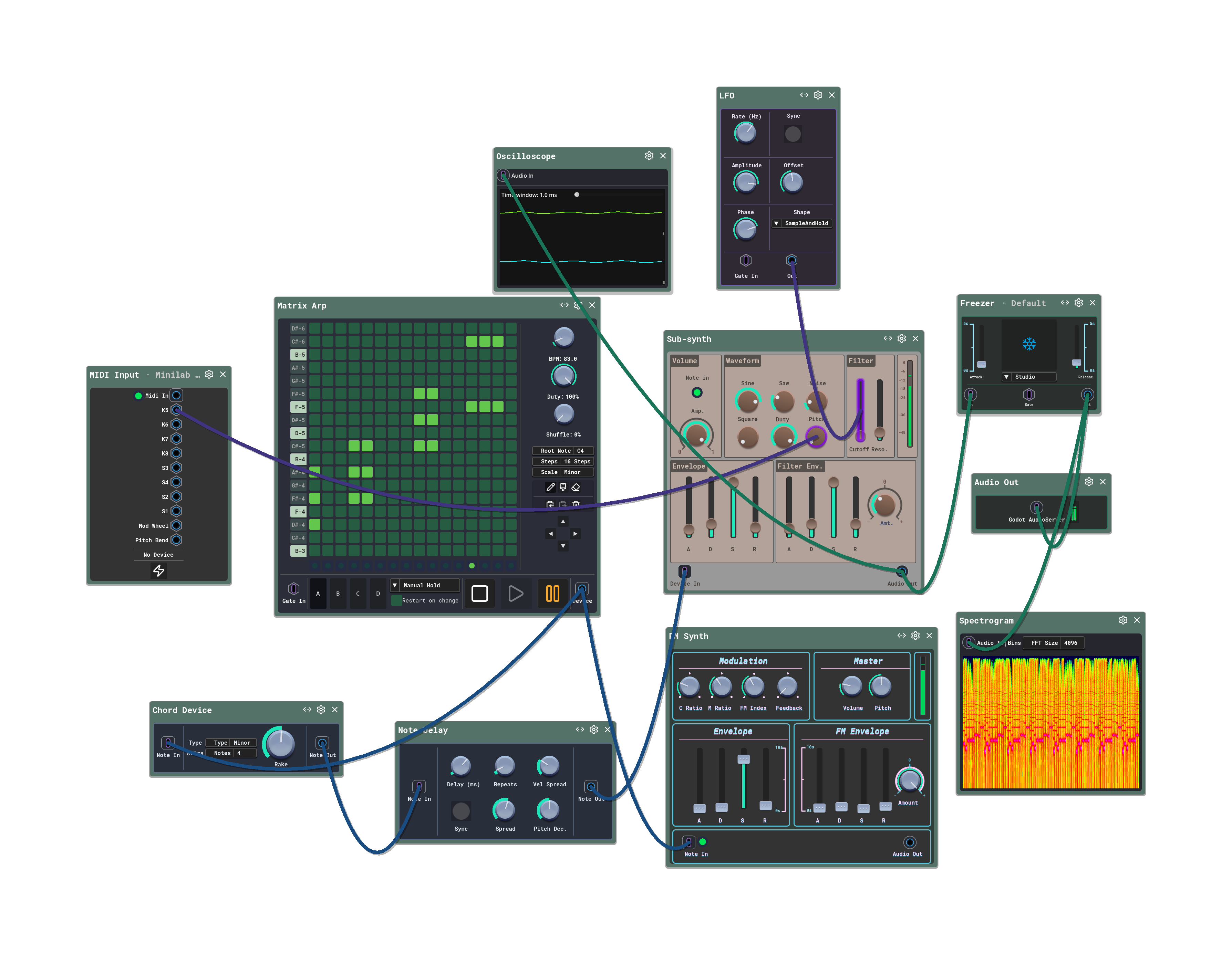
Sigilgraph Audio Workbench: A world-editor for sound
Why we abandoned the traditional timeline and rebuilt the audio workstation like a video game.
The tools we use have a sneaky way of deciding what kind of art we make. If you write music in a modern Digital Audio Workstation (DAW), you’ve probably felt this. Most DAWs are built around a global timeline and a grid. They practically beg you to build music out of blocky, aligned segments. On top of that, your sounds are boxed up inside plugin windows. Tweaking them means clicking through nested menus and navigating a serpentine path of sub-panels just to change a filter.
We wanted to build something different. We wanted a space where you can start making noise instantly, without having to accept a massive application’s way of thinking. The goal was simple: start with nothing, and opt-in to complexity only when your ideas need it.
An Engine Born from Scratch
To make this work, we couldn’t rely on existing frameworks. We built a custom audio synthesis engine entirely from scratch. Doing this gave us two massive advantages: portability and embeddability. Because the engine is completely decoupled, we were able to embed it directly inside the Godot game engine. This means the app has room to grow far beyond a standard desktop audio application, borrowing mechanics and flexibility from the gaming world.
Stepping into the Metaphysical
When we looked at other visual audio software, such as Eurorack emulators or virtual synth racks, we noticed they all try really hard to look and act like physical hardware. But hardware has physical limits. Software, on the other hand, is metaphysical. There’s no reason to restrict ourselves to what physical wires can do.
In Sigilgraph, a wire isn’t just a line carrying a sound wave. It’s a relationship. You can connect a wire to almost anything. Want to control a knob or slider? Just drag a wire to it. You can connect a note envelope to filter resonance to make it react to how hard you hit a key. Or wire an audio envelope generator to the Q and frequency parameters of an equalizer to build an auto-wah on the fly.
The entire workflow follows a single, simple rule: connect a wire where you want change. No routing matrices, no dropdown menus, and no hidden configuration screens. Just a big canvas, some devices, and a bunch of wires.
The “DAW-less” Yearning
Over the past few years, there’s been a massive shift in how people make electronic music. More and more producers are going “DAW-less” by abandoning computer screens entirely to build setups out of physical hardware synths, drum machines, and patch cables. It’s not just a trend; it’s a deep yearning to escape the rigid, sterile grids of software and return to something unconstrained.
Sigilgraph was designed with that exact feeling in mind. We wanted to bring the freedom of a hardware sandbox into software. While a screen can never truly match the tactile weight of physical wood and metal, it can offer something hardware cannot: the ability to build an instrument that doesn’t exist in the real world.
By allowing external MIDI controllers to bind directly to any wire, knob, or slider in the app, you can instantly turn your physical controller into whatever device you’re patching on the screen. If you have a controller with knobs, sliders, or pads, you can wire them into relationships in real-time, creating generative systems and reactive behaviors on the fly. You’re not just mapping a controller to a pre-built plugin; you’re inventing a custom instrument that no manufacturer has ever made.
Staying in the Flow
We also wanted to fix the classic flow-killer: file system navigation. Usually, if you want to sample a synth sound you just made, you have to export it, name it, find it in your OS file explorer, and drag it back into a sampler.
We made the sampler a closed loop. You can generate a sound, sample it directly within the canvas, and immediately feed it back into drum machines, samplers, or track lanes. Everything stays inside the canvas. No file menus, no explorer windows, no friction.
Finally, because the app runs inside a game engine, it behaves like a game. It’s a focused, fullscreen experience. The UI is completely GPU-bound, meaning all the visual cables, meters, and animations run on your graphics card without eating up the CPU cycles your audio thread needs to stay glitch-free.
At the end of the day, we wanted to build a tool that feels alive, behaving less like a spreadsheet and more like an instrument.