Neuron, Granular Engines, and Portals
An overview of four new devices in Sigilgraph: the Neuron modulation operator, Granular Synth, Granular Cloud, and signal Portals.
The latest update to Sigilgraph Audio Workbench introduces four new devices:
- Neuron - A reactive control device that converts audio dynamics and pitch into modulation signals.
- Granular Synth - A polyphonic instrument that turns static audio samples into playable grain clouds and evolving pads.
- Granular Cloud - A real-time effect that granulates incoming audio streams and freezes live buffers into infinite textures.
- Portals (
Port-al InandPort-al Out) - Wireless signal links that route audio, notes, gates, and CV across the canvas without visible cable clutter.
Here is a breakdown of what each device is for, how it operates, and examples of how to use them in your patches.
1. Neuron
What It Is For
Standard modulation sources like LFOs and envelope generators follow fixed, pre-programmed shapes. Neuron is designed to create reactive, listening patches where one sound’s physical energy directly drives another part of the system.
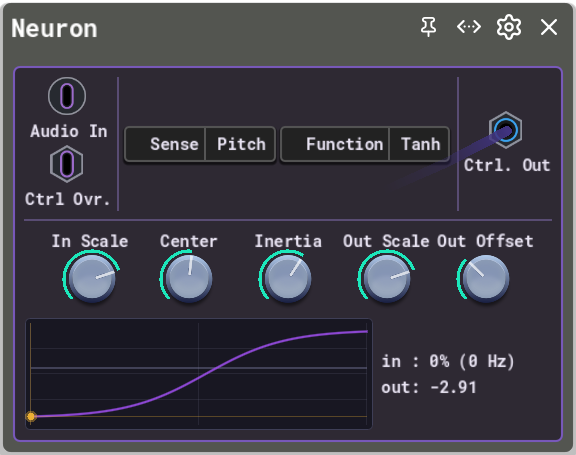
Instead of running on a clock, Neuron listens to live audio, measures its volume or pitch, and maps that value through a non-linear activation curve to output a continuous Control Voltage (CV) signal.
Common Use Cases
- Dynamic Sidechain & Ducking: Track the amplitude of a kick drum to duck a bassline cutoff or compress an effect chain with custom curve shapes.
- Pitch-Responsive Timbre: Track the pitch of a melodic lead so that higher notes naturally open up distortion drive, increase reverb wetness, or shift filter resonance.
- Organic Feedback Loops: Route an audio source into Neuron, then wire Neuron’s CV output back into the source’s frequency or FM depth. The engine’s built-in unit-delay guard allows for self-regulating, chaotic modulation without system lockups.
Sensing Modes
- Amplitude: An internal one-pole envelope follower measures the instantaneous level and dynamics of the incoming audio.
- Pitch: An embedded pitch tracker (using the McLeod Pitch Method) detects fundamental musical frequencies across a 50 Hz to 2000 Hz range and maps them onto a normalized 0 to 1 value.
- Control Input: When an external control cable is plugged into the Control In port, Neuron bypasses the audio sensor and acts as a non-linear transfer function for other LFOs or sequencers.
Activation Functions
The sensed value is shifted by Center, multiplied by In Scale, evaluated through the selected curve, multiplied by Out Scale, and shifted by Out Offset.
| Function | Response | Notes |
|---|---|---|
| Linear | 1:1 pass-through | Direct scaling and offset without curve shaping. |
| Sigmoid | S-curve between 0 and 1 | Soft transition around the center point; good for organic swelling. |
| Tanh | Hyperbolic tangent curve | Symmetrical S-curve with sharp saturation near the limits. |
| ReLU | Passes positive values only | Acts as a threshold gate; produces no output until the signal crosses center. |
| Softplus | Smooth logarithmic curve | Gentle turn-on threshold without hard corners. |
| Bump | Gaussian bell curve | Peaks at center and drops off on either side; triggers modulation only on a specific target pitch or level. |
| Notch | Inverted bell curve | Dips at center and stays high elsewhere; cuts modulation when a sweet spot is reached. |
| Step | Binary switch | Hard digital trigger: 0 below center, 1 above center. |
| Abs | Absolute value | V-shaped response around center; reacts equally to positive and negative deviations. |
Parameters
- In Scale (-8 to +8): Input sensitivity. Negative values invert the sensor reaction.
- Center (0 to 1): Sets the threshold or focal point on the response curve.
- Inertia (0 to 2s): Slew-rate low-pass filter on the output CV to smooth sudden jumps into gliding transitions.
- Out Scale (-5 to +5): Sets output modulation depth.
- Out Offset (-1 to +1): Sets resting output baseline level.
2. Granular Synth
What It Is For
Traditional samplers play audio files linearly from beginning to end. The Granular Synth is designed to deconstruct audio recordings into hundreds of microscopic sound fragments (grains) ranging from a few milliseconds to several seconds long.
By scattering, looping, detuning, and overlapping these grains, you can turn a short 1-second sample (like an acoustic guitar strum, a vocal vowel, or a field recording) into an evolving, playable polyphonic synthesizer pad, or shatter it into pointillistic rhythmic textures that follow your keyboard.
Common Use Cases
- Infinite Ambient Pads: Load a brief acoustic instrument sample, set high grain density and duration, add position spray, and play lush, evolving chord voicings that sustain indefinitely.
- Pointillistic Micro-Rhythms: Set short grain durations and low density to turn speech or noise recordings into sparse, rhythmic clouds of acoustic clicks and taps.
- Microtonal Shimmer Textures: Use pitch spray to randomly detune grains across microtonal intervals, creating rich chorus-like unisons and wide stereo soundbeds.
Parameters
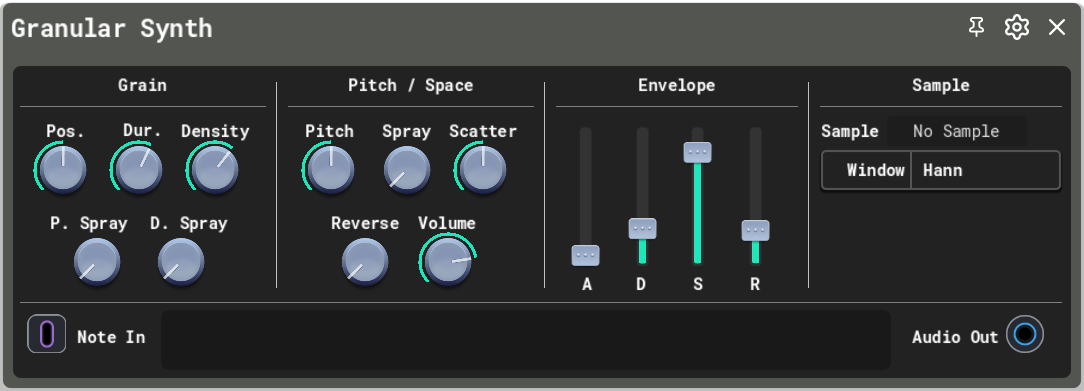
- Position & Position Spray: Sets the playhead location in the sample. Position Spray adds random position jitter to each new grain.
- Duration & Duration Spray: Sets grain length. Duration Spray introduces random length variation.
- Density: Governs how many grains are birthed per second.
- Pitch & Pitch Spray: Sets coarse and fine transpose. Pitch Spray randomly detunes individual grains within the cloud.
- Scatter: Randomly pans grains across the stereo field for wide spatial dispersion.
- Reverse Probability: Probability (0% to 100%) that a grain plays backwards.
- Window Type: Selects the grain amplitude envelope shape (Hann, Hamming, Blackman, Triangle, Rectangular, Tukey, or Welch) to control boundary smoothness and prevent clicking.
- ADSR: Standard Attack, Decay, Sustain, and Release envelope for polyphonic note shaping.
The faceplate includes an interactive waveform display showing sample markers, playhead position, and active grain boundaries.
3. Granular Cloud
What It Is For
While the Granular Synth plays stored sample files from disk, the Granular Cloud is a real-time DSP effect processor. It continuously captures incoming live audio into a 5-second circular lookback buffer and granulates that stream in real time.
It is designed to turn live drum patterns, synth arpeggios, guitar inputs, or vocal lines into shimmering delay trails, dense washes, and time-stretched acoustic textures. With its freeze function, it can capture a fleeting moment of live sound and lock it into an infinite background drone.
Common Use Cases
- Shimmer Delays & Ambient Smears: Place Granular Cloud after a synth lead, dial in moderate feedback with high-frequency damping, and add pitch spray for cascading, pitch-shifted echoes.
- Live Soundbed Freezing: Trigger the Freeze function during a song transition to lock the current audio slice in memory, creating a sustained drone bed to solo over.
- Rhythmic Beat Granulation: Route a drum machine through Granular Cloud with high scatter and reverse probability to generate glitchy, syncopated stereo rhythm variations.
Parameters
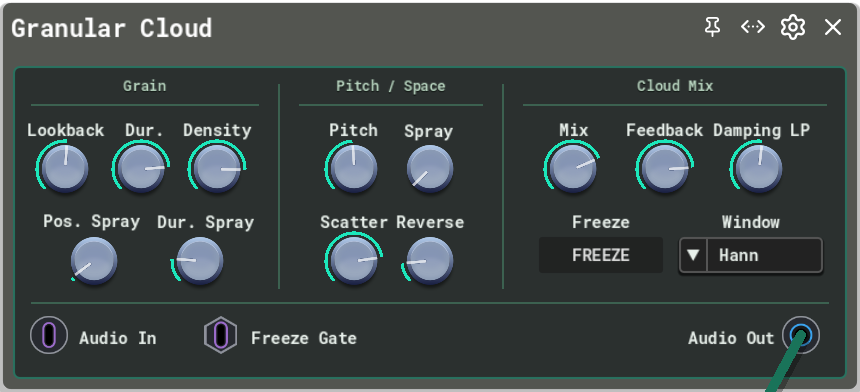
- Position & Position Spray: Sets how far back in the 5-second circular buffer grains are sampled.
- Duration & Duration Spray: Sets grain duration and random size variance.
- Density: Sets the rate of grain generation.
- Pitch & Pitch Spray: Shifts grain pitch and adds random detuning.
- Scatter: Spreads grains across the stereo image.
- Reverse Probability: Probability of backward grain playback.
- Mix: Dry/wet balance.
- Feedback & Damping: Routes granulated output back into the circular buffer with high-frequency attenuation to prevent harsh accumulation.
- Freeze: Locks the recording buffer. When frozen, new incoming audio is bypassed and the existing buffer loops through the grain engine indefinitely.
Freeze can be activated manually via the faceplate button or automated via the Freeze Gate In port.
4. Portals (Port-al In and Port-al Out)
What It Is For
As modular patches grow across the canvas, routing cables between distant sections (such as a drum sequencer on the left, a synth bank in the center, and a master mixing rack on the right) creates visual clutter with long crossing lines.
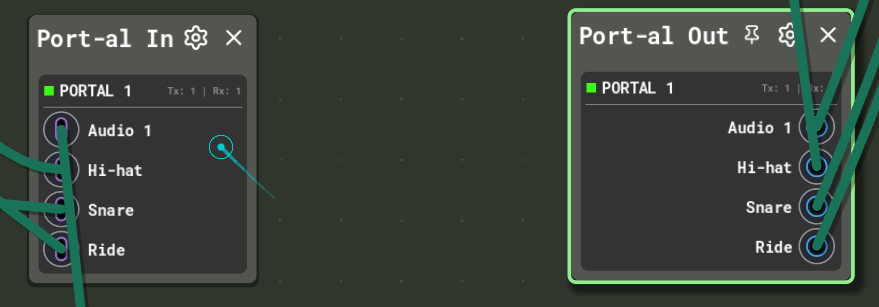
Portals act as wireless patch bays. They allow you to transmit multiple audio, MIDI, gate, and CV signals across any canvas distance through invisible internal links.
Common Use Cases
- Clean Sub-Mixing: Route individual drum channels into a
Drums Busportal and receive them at your master mixer without stretching cables across the screen. - Central Modulation Routing: Place a bank of LFOs and Neurons in one sector of your canvas and broadcast control voltages to distant instruments wirelessly.
- Instant Workspace Navigation: Click any portal’s channel name or color badge to smoothly glide the viewport camera directly to its paired partner across the canvas.
Supported Signal Types
Each portal supports multiple configurable lanes for all four core signal families:
- Audio: Multi-channel stereo and mono audio streams.
- Note: Polyphonic MIDI note and velocity events.
- Gate: Trigger pulses and transport clocks.
- Control: Continuous CV modulation signals.
5. Practical Patch Recipes
Recipe 1: Self-Modulating Granular Loop
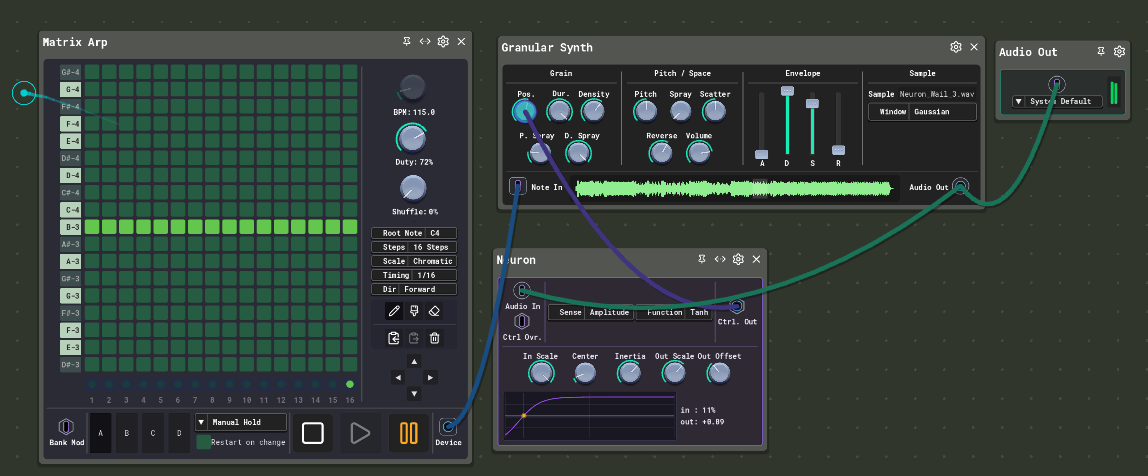
This patch sets up a feedback relationship where a sound’s volume continuously steers its own grain position:
- Signal Path:
- A Matrix Arp sends note triggers to the Granular Synth.
- The Granular Synth audio output splits: one branch feeds the master Audio Out, and the other feeds the Audio In of Neuron.
- Neuron tracks the incoming amplitude through a Tanh curve and outputs a continuous control voltage.
- Neuron’s Ctrl. Out routes directly back into the Position knob of the Granular Synth.
- Topology Behavior: As grains accumulate and overlap, rising volume levels push the playhead to new regions of the sample. When volume drops, the playhead settles back. This creates a self-modulating acoustic loop without external automation.
Recipe 2: Amplitude-Controlled Transient Filtering
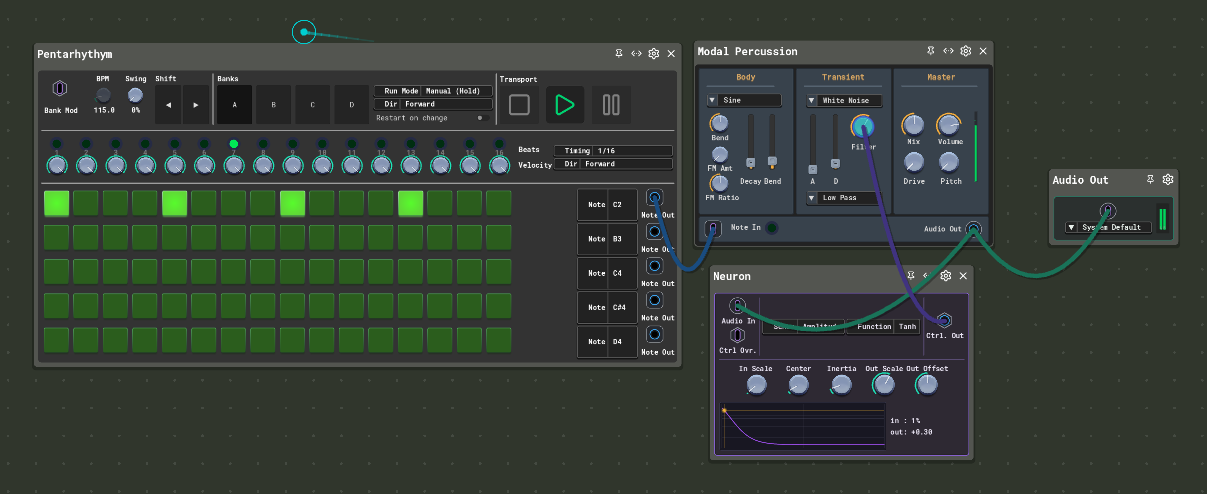
This patch uses a percussive strike’s own energy to shape its transient filter:
- Signal Path:
- A Pentarhythym drum machine triggers note events into Modal Percussion.
- The Modal Percussion audio output splits to the master Audio Out and into the Audio In of Neuron.
- Neuron measures the amplitude envelope of each hit and generates a reactive control signal.
- Neuron’s Ctrl. Out connects directly to the Filter knob on the transient noise layer of Modal Percussion.
- Topology Behavior: Each drum strike produces an instantaneous amplitude burst that sweeps the noise filter. As the body of the drum note decays, the filter closes, tailoring the bite, brightness, and tail of the strike dynamically from its own sound.
Availability
These devices are available now in the current build of Sigilgraph Audio Workbench.