Audio Workbench v0.9.2: Dual-Pane Composer, 4 New Modular Devices & Discrete CV Modulation
Explore the v0.9.2 update featuring a decoupled dual-pane timeline Composer, 4 new modular devices (Gamepad, Stretch, Crossfader, Comment), discrete CV modulation, and calibrated engine controls.
The v0.9.2 update for Sigilgraph Audio Workbench is officially live! This release represents a major evolutionary leap for both timeline-based composition and modular canvas sound design.
From an architectural overhaul of the Composer timeline to four brand-new modular devices, discrete parameter CV modulation, and precision-calibrated audio engine controls, here is a detailed breakdown of everything new in version 0.9.2.
1. Dual-Pane Composer Architecture
In earlier builds, arranging songs and editing clip details could feel constrained inside a unified view. In v0.9.2, timeline arrangement and detail editing workflows are fully decoupled into an ultra-responsive dual-pane layout:
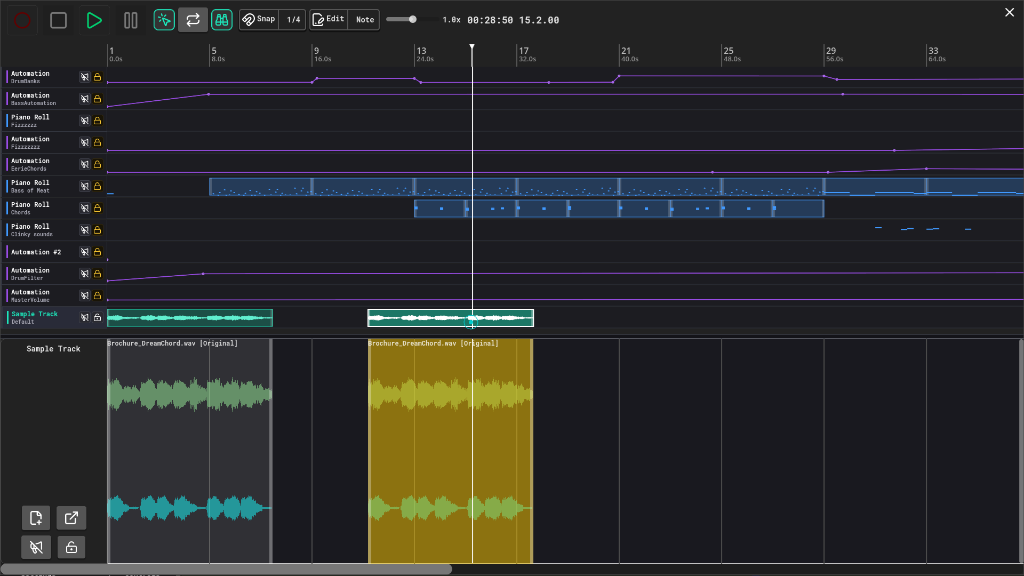
- Decoupled Dual-Pane Split: The upper pane renders full-song arrangement tracks as compact 40px strips. Selecting any track opens its dedicated full editor in the lower pane (Piano Roll grid, Automation curve editor, or Sample waveform view) without layout recomputation stalls.
- High-Performance Overview Rendering (95%+ Less UI Overhead): The overview canvas bypasses individual Control nodes, drawing clips, heatmaps, RMS audio peaks, and automation paths via custom GPU batch draw calls. This completely eliminates layout recalculation hitches across large sessions with high track counts.
- Interactive Clip Boundary Resizing: Drag clip boundaries directly on the timeline overview to quickly trim or extend start and end offsets without splitting clips into pieces.
- Marquee Multi-Selection: Click and drag a bounding box across tracks to move, duplicate, or delete multiple clips in one fluid operation.
- Real-Time Automation Recording: Incoming knob sweeps, fader adjustments, and external CV signals record directly into active automation lanes during playback.
- Canvas Culling for Maximum DSP Headroom: When the Composer overlay is active, background modular canvas draw calls and node updates pause automatically, dedicating CPU and GPU resources exclusively to audio DSP and timeline rendering.
2. Four New Modular Devices
Version 0.9.2 expands the modular toolbox with four specialized devices designed for performance control, spectral manipulation, audio routing, and canvas organization:
Gamepad Device (Hardware HID Controller Support)
Turn standard gaming controllers and joysticks (Xbox, PlayStation, Nintendo Switch) into expressive modular performance interfaces.
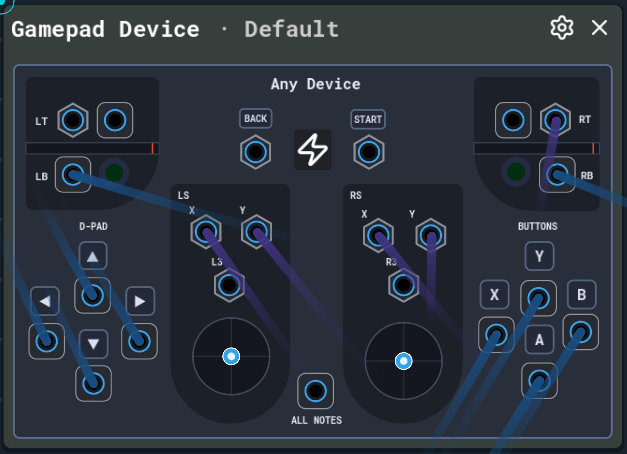
- Dual Thumbstick CV: Exposes analog X/Y stick axes as independent bipolar or unipolar CV streams, ideal for dual-parameter macro morphing.
- Analog Trigger Sweeps: Analog triggers function as continuous modulation sweeps or threshold-based gate comparators.
- Button & D-Pad Note Mapping: Maps controller face buttons and directional pads to discrete MIDI note pitches or control CV values.
Stretch Device (Phase-Vocoder Time-Stretching & Spectral Smear)
An STFT (Short-Time Fourier Transform) phase-vocoder processor for decoupling playback duration from pitch in real time.
- Extreme Time-Stretching: Stretch or compress audio duration over extreme factors without altering pitch.
- Spectral Smear Core: Blurs phase coherence across consecutive FFT frames to diffuse transient energy into ethereal, sustained ambient drones and textured soundbeds.
Crossfader Device (Dedicated Stereo Audio Crossfader)
A precision utility crossfader with CV-controlled mix positions and selectable crossfade curves:
- Selectable Mix Laws: Choose between Linear, Equal Power (+3 dB boost at center detent), Smoothstep S-Curve, and DJ Cut (instant threshold switching).
- Full CV Modulation: The mix position responds directly to incoming control voltage, allowing LFOs, sequencers, or gamepads to automate crossfades.
Comment Device (Canvas Annotation & Documentation)
Keep intricate modular patches organized. Resizable text blocks allow you to write patch notes, label routing paths, or create performance guides right on the modular canvas. Includes background color categorization and full undo/redo support.
3. Discrete Parameter CV Modulation
Control voltage is no longer limited to smooth, continuous knobs and faders. In v0.9.2, CV can be patched directly into selected discrete parameter selectors (dropdown menus and pill buttons):
- CV Quantization: Incoming
0.0to1.0CV is quantized and scaled evenly across the available enum options of the target parameter. - Supported Targets: Route stepped CV into Matrix Arpeggiator playback directions, step counts, root keys, and scales, or automate Distortion transfer curve algorithms on the fly.
Note: Some high-overhead selectors remain static to preserve real-time audio thread stability.
4. Audio Engine & Architecture Refinements
- Calibrated Unity-Gain Knobs: Mixer channel faders, master output, and Crossfader gain knobs are calibrated to exact 0 dB unity gain at the 12 o’clock center position.
- Button Control Upgrades: Added a latching Switch mode alongside momentary Press, plus a Switch In CV port for automated triggering via incoming pulses.
- Note Map to Gate: Added a Hold Latest latch mode to hold gate outputs high until the next note arrives.
5. Technical Patching Tips
- Gamepad Modulation: Wire thumbsticks to filter cutoffs and resonator pitches while mapping the analog shoulder triggers to crossfader positions for hands-on live performance.
- Phase-Vocoder Drone Generator: Run short percussive or vocal samples through the Stretch Device with high smear settings to turn brief transients into lush, endless background textures.
- Generative Arpeggios via Discrete CV: Send a slow stepped CV sequencer or sample-and-hold into the Matrix Arp’s direction or scale selector to evolve musical phrases algorithmically.
- Canvas Organization: Color-code signal chains using Comment Devices (e.g., green for rhythm sections, cyan for leads, purple for modulation sources).
- Latching Logic: Toggle patch states dynamically by feeding clock dividers or gate bursts into the Button Control device’s new Switch In jack.
Availability & Links
Audio Workbench v0.9.2 is available immediately on Steam and itch.io: