Graph Mode and Trusted Code: Two Ways to Run a Sound Script
The Sound Script device runs your code in one of two modes. Graph mode is safe to share and runs anywhere. Trusted code can do anything the browser REPL can, but only on a machine that has been told to trust it. Here is the difference, with one organ written both ways.
The Sound Script device takes a piece of C# and turns it into sound. It can run that code in one of two modes, and the difference decides whether a script can travel: inside a patch, onto the Steam Workshop, or over the External API.
- Graph mode lets a script describe a sound out of the library’s own parts. It cannot run code of its own on the audio thread, so it is safe to run from a patch you have never seen.
- Trusted code (the device calls it Code mode) lets a script do anything the web REPL allows: loops, your own functions, custom per-sample operators. In exchange, it only runs on a machine where you have read the script and said you trust it.
Most scripts never need more than Graph mode. This post explains where the line is, how a script crosses it, and what to do when yours needs to.
Graph mode: describing a sound
A Graph script is a chain of calls that builds a sound. Saw(v.Frequency).LowPass(1800).Adsr(0.01, 0.2, 0.6, 0.3) does not synthesize anything by itself. It describes a saw wave through a filter and an envelope, and Sigil.Sound’s own operators, which are written and tested for real time, do the rendering.
That is what makes it safe. Running the script is a finite walk through a handful of calls, bounded by the length of the text. It cannot loop forever, allocate without limit, or reach files, the network, threads or reflection, because none of those can be named in a Graph script. The check is a positive allow-list: if a kind of syntax or a library member is not on the list, it is refused.
What Graph mode allows
- Method chains, arithmetic,
?:, andvardeclarations - Every oscillator, filter, effect and envelope, with a number, a knob or another sound anywhere a parameter goes
- The pattern language:
Mini.Notes, scales, chords,Every,Euclid,Play,Jux - The device’s own API:
Knob,Slider,Asset,In.Audio,In.Control,Out.Control,Out.Notes - A lambda as the voice of
Poly(...)orPlay(...), and as the function ofEvery,SometimesandFeedback
What Graph mode refuses
- Loops,
ifstatements (use?:), blocks, local functions andnew - Assigning to a variable after you declare it
- Your own per-sample functions, such as
Fn(...), and custom operators, such asSound.FromOperator - String interpolation and exception handling
Graph mode also caps anything that sizes memory. Delay and TapeDelay take at most 10 seconds of maxTime, Reverb takes a size of at most 10, and Poly and Play take at most 32 voices. Without those caps a stranger’s patch could ask for gigabytes when it loads.
When a script breaks one of these rules, the compiler tells you which one and on which line, so you can rewrite it or decide you need the other mode.
Trusted code: everything the REPL can do
Code mode is the full language. Loops, arrays, your own functions, and Sound.FromOperator for writing an operator that runs once per block with your own state. If you have used the Sigil.Sound REPL in the browser, this is the same thing.
Code runs with the app’s own rights, so it has to come from somewhere you trust. Two rules decide that:
- Pressing Apply in the editor is you saying “I trust this.” A script you typed or pasted and applied runs in Code mode.
- Trust belongs to your machine, not to the script. The device remembers the SHA-256 hash of the exact text, in a file of its own that never travels inside a patch. Change one character and it is a new script that has to be applied again. Opening a patch can never bring its own trust along.
A script that arrives any other way (inside a patch you opened, in a Workshop item, or through the External API) starts in Graph mode, unless this machine already trusts that exact text. If it only needs Graph mode, it just runs. If it needs more, the device keeps the previous script playing and says:
Not trusted yet: this script needs Code mode. Read it, then press Apply to run it.
Read it first. That sentence is the whole security model: the code that runs is the code you looked at.
One honest note. Code mode is a convenience for you, not a sandbox. The compiler still refuses files, network, reflection, processes and unsafe code, but that filter is a best effort and not a boundary. Only apply code you would be willing to run as a program.
A worked example: a church organ
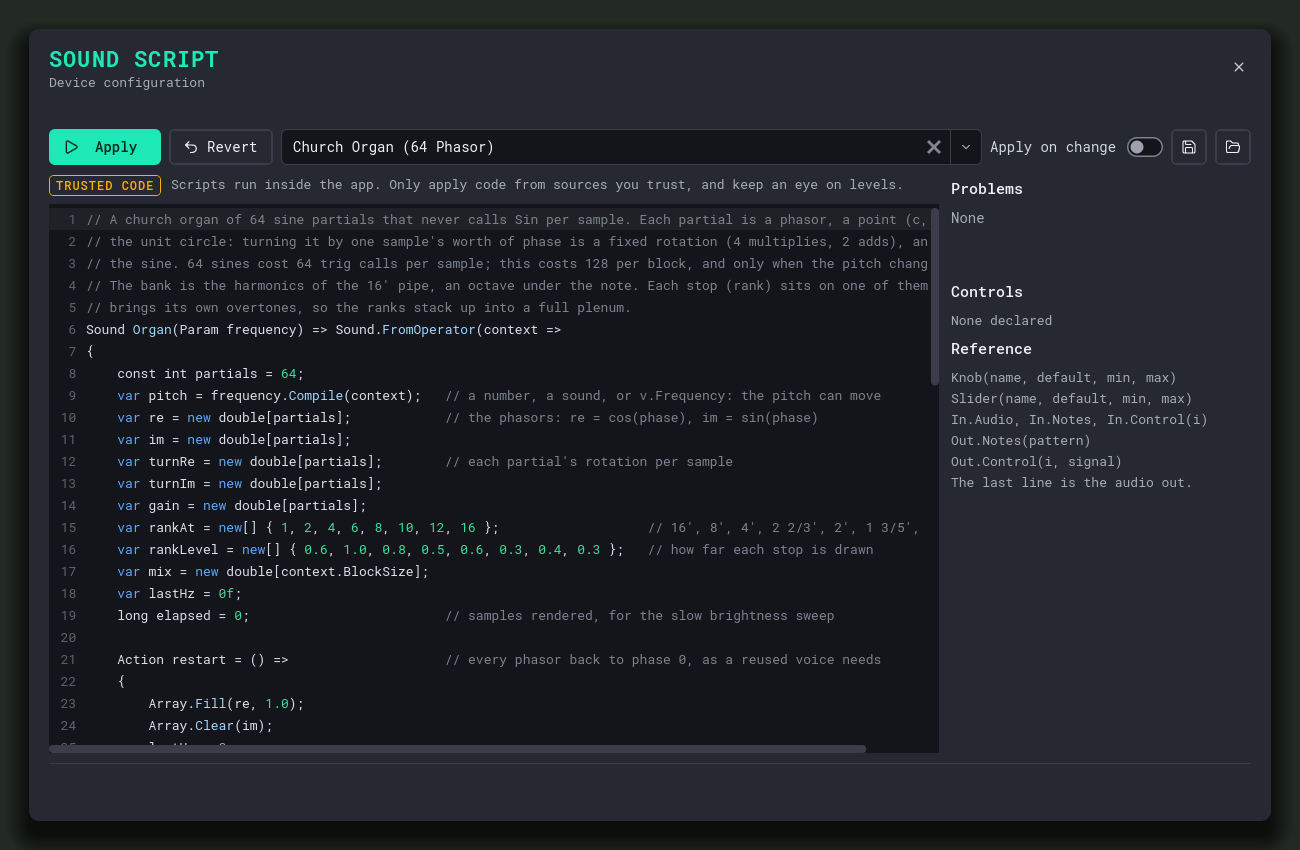
A good test of the line between the two is an organ built from 64 sine partials. Calling Sin 64 times per sample is wasteful, so the Code version avoids it: each partial is a phasor, a point on the unit circle that turns by a fixed rotation per sample (four multiplies and two adds), and the sine is one of its coordinates. Trigonometry only runs when the pitch changes.
That needs state that survives from sample to sample, arrays, nested loops and a custom operator. All of it is off the Graph list, so this script needs Code mode:
// A church organ of 64 sine partials that never calls Sin per sample. Each partial is a phasor, a point (c, s) on
// the unit circle: turning it by one sample's worth of phase is a fixed rotation (4 multiplies, 2 adds), and s is
// the sine. 64 sines cost 64 trig calls per sample; this costs 128 per block, and only when the pitch changes.
// The bank is the harmonics of the 16' pipe, an octave under the note. Each stop (rank) sits on one of them and
// brings its own overtones, so the ranks stack up into a full plenum.
Sound Organ(Param frequency) => Sound.FromOperator(context =>
{
    const int partials = 64;
    var pitch = frequency.Compile(context);   // a number, a sound, or v.Frequency: the pitch can move
    var re = new double[partials];            // the phasors: re = cos(phase), im = sin(phase)
    var im = new double[partials];
    var turnRe = new double[partials];        // each partial's rotation per sample
    var turnIm = new double[partials];
    var gain = new double[partials];
    var rankAt = new[] { 1, 2, 4, 6, 8, 10, 12, 16 };                   // 16', 8', 4', 2 2/3', 2', 1 3/5', 1 1/3', 1'
    var rankLevel = new[] { 0.6, 1.0, 0.8, 0.5, 0.6, 0.3, 0.4, 0.3 };   // how far each stop is drawn
    var mix = new double[context.BlockSize];
    var lastHz = 0f;
    long elapsed = 0;                         // samples rendered, for the slow brightness sweep

    Action restart = () =>                    // every phasor back to phase 0, as a reused voice needs
    {
        Array.Fill(re, 1.0);
        Array.Clear(im);
        lastHz = 0;
        elapsed = 0;
    };
    restart();

    return Operator.From(block =>
    {
        var hz = Max(pitch.Next(block.Length)[0], 1f) / 2;   // the 16' pipe: the 8' rank is the note itself
        var count = Min(partials, (int)(context.Nyquist / hz));   // partials past Nyquist would alias: drop them

        if (hz != lastHz)                     // the only trig: when the pitch moves, re-aim the rotations
        {
            lastHz = hz;
            for (int k = 0; k < partials; k++)
            {
                var angle = 2 * PI * hz * (k + 1) / context.SampleRate;
                turnRe[k] = Cos(angle);
                turnIm[k] = Sin(angle);
            }
        }

        // The spectrum: every rank is a pipe with overtones m = 1, 2, 3... that fade as m^-tilt, placed on its
        // harmonic of the 16'. Tilt sweeps slowly, like a swell box opening and closing.
        var tilt = 1.6 + 0.9 * Sin(2 * PI * 0.08 * elapsed / context.SampleRate);
        elapsed += block.Length;
        Array.Clear(gain);
        for (int r = 0; r != rankAt.Length; r++)
            for (int m = 1; rankAt[r] * m <= count; m++)
                gain[rankAt[r] * m - 1] += rankLevel[r] * Pow(m, -tilt);

        double total = 0;
        for (int k = 0; k < partials; k++)
            total += gain[k];

        mix.AsSpan(0, block.Length).Clear();
        for (int k = 0; k < count; k++)
        {
            double c = re[k], s = im[k], dc = turnRe[k], ds = turnIm[k], g = gain[k] / total;
            for (int i = 0; i != block.Length; i++)
            {
                mix[i] += s * g;
                (c, s) = (c * dc - s * ds, c * ds + s * dc);   // rotate by one sample
            }

            var fix = 1 / Sqrt(c * c + s * s);   // rounding makes the point drift off the circle: pull it back
            re[k] = c * fix;
            im[k] = s * fix;
        }

        for (int i = 0; i != block.Length; i++)
            block[i] = StereoFrame.Mono((float)mix[i]);
    }, restart);
}, description: $"Organ({frequency})");

Poly(8, v => Organ(v.Frequency).Adsr(attack: 0.06, decay: 0.1, sustain: 0.9, release: 0.5))
    .Reverb(size: 1.8, decay: 5, mix: 0.35)     // a stone nave
    .Limit()
The same organ in Graph mode
Graph mode cannot run that operator, but it can describe something close to it from stock parts. Each stop becomes one oscillator at its pipe ratio. A saw wave already carries the 1/m overtone series that the Code version builds partial by partial. The slow tilt sweep becomes a low-pass whose cutoff follows the note, so every note keeps the same number of audible harmonics whatever its height, and a slow sine opens and closes it like a swell box.
Poly(8, v =>
    (
        Triangle(v.Frequency * 0.5) * 0.6        // 16'
        + Triangle(v.Frequency)     * 1.0        // 8'
        + Saw(v.Frequency * 2)      * 0.5        // 4'
        + Saw(v.Frequency * 3)      * 0.3        // 2 2/3'
        + Saw(v.Frequency * 4)      * 0.35       // 2'
        + Saw(v.Frequency * 5)      * 0.15       // 1 3/5'
        + Saw(v.Frequency * 6)      * 0.2        // 1 1/3'
        + Saw(v.Frequency * 8)      * 0.15       // 1'
    )
    .LowPass(v.Frequency * Sine(0.08).Range(5, 14))      // swell box: brighter and darker, tracks the note
    .Gain(0.25)
    .Adsr(attack: 0.06, decay: 0.1, sustain: 0.9, release: 0.5))
    .Reverb(size: 1.8, decay: 5, mix: 0.35)     // a stone nave
    .Limit()
Read the two side by side and the trade is plain. The Graph version is shorter, easier to change and runs anywhere, including as a Workshop item. The phasor version is richer: it has 64 true sine partials with the spectrum shaped by an exact curve, where the Graph version has eight oscillators and a filter. They sound very close, but not the same, and the Code version sounds a little fuller.
If the Graph version is close enough for what you are making, publish that one. If it is not, keep the Code version for your own machine.
Sharing on the Steam Workshop
The Workshop follows from all of this. A Workshop item is code from strangers, so it can only use the mode that needs no trust:
- Publishing: the Steam Hub checks every Sound Script in your patch by compiling it in Graph mode, the same call the device makes, so the check and the device cannot disagree. A script that fails is refused, with the first error and its line.
- Installing: a patch can still arrive from a hand-built package that never went through the publisher, so the app checks again when it installs an item. A script that does not pass Graph mode is replaced by a short comment and a straight audio pass-through. Apply-on-change is also switched off for installed scripts, so a keystroke in one can never apply it by accident.
If you subscribe to an item and want to run something bigger, copy the script into the editor, read it, and press Apply. That is your decision, made on your machine, and it is remembered there.
Which one should I use?
| Graph mode | Trusted code | |
|---|---|---|
| What it does | Describes a sound from the library’s parts | Runs your own code, including per-sample operators |
Loops, if, new, local functions | No | Yes |
Sound.FromOperator, Fn(...) | No | Yes |
| Runs from a patch or the Workshop | Yes | Only after you read it and press Apply |
| Needs trust | Never | Yes, per machine, per exact text |
| Good for | Synths, effects, patterns, knobs, anything built from the operators | Custom DSP, algorithms the operators do not cover |
Start in Graph mode. Most synths, effects and note patterns fit there, and a Graph script works on every machine and in every patch you share. Reach for trusted code when you need an operator the library does not have, and keep in mind that it stays on the machine that trusts it.